EMAILS FROM
MONKEYBRAINS
- > Overview
- > Gmail
- > Outlook
- > Limiting Factors
- > Microsoft 365

Overview
Monkeybrains is primarily a WISP (Wireless Internet Service Provider). What this means is Monkeybrains uses microwave technology to create a wireless network covering much of San Francisco. We deliver internet service to individual locations by placing an antenna on the roof. This antenna picks up an encrypted wireless signal from one of our network access points which can be found on over 1000 buildings city-wide.
Gmail
Monkeybrains is primarily a WISP (Wireless Internet Service Provider). What this means is Monkeybrains uses microwave technology to create a wireless network covering much of San Francisco. We deliver internet service to individual locations by placing an antenna on the roof. This antenna picks up an encrypted wireless signal from one of our network access points which can be found on over 1000 buildings city-wide. 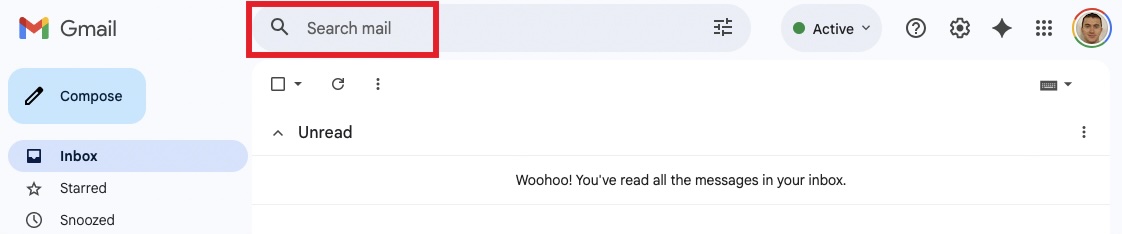
From the roof, we run a Cat5 Ethernet wire either to the unit, telecom closet, or the property's Ethernet patch panel. We are happy to comply with any building wiring guidelines or work with the building's riser company if required. 
From inside the unit, the Cat5 Ethernet cable can be used to set up your internal network via your wireless router (wifi). 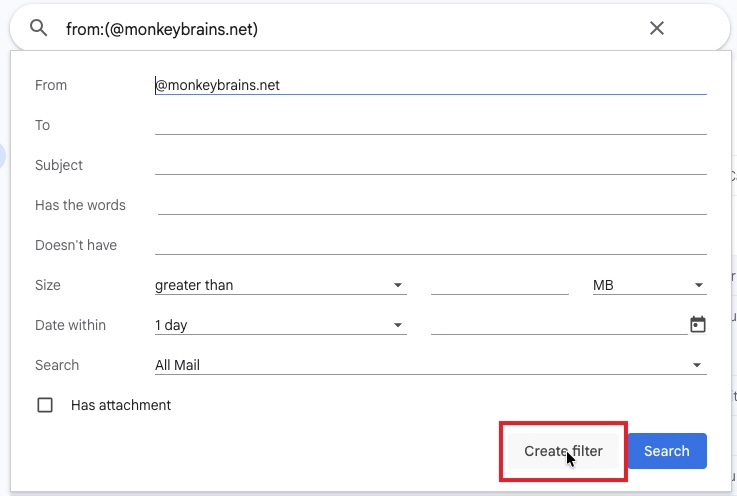
From inside the unit, the Cat5 Ethernet cable can be used to set up your internal network via your wireless router (wifi). 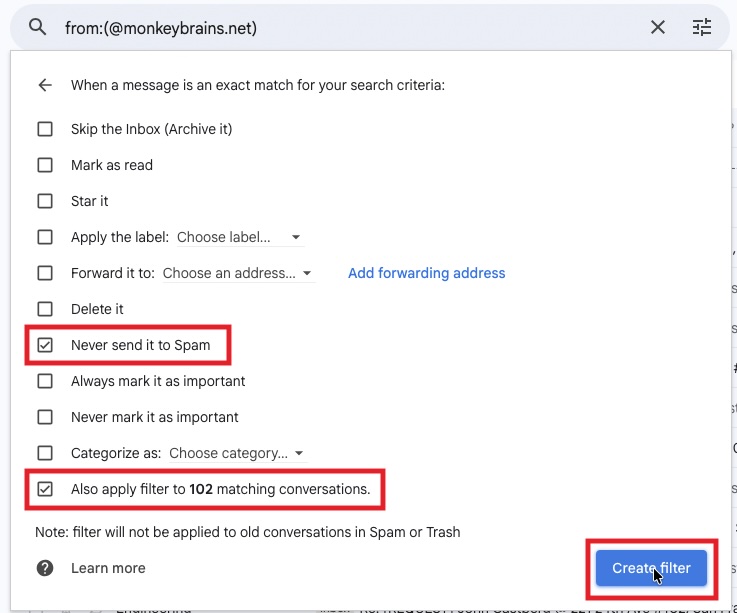
From inside the unit, the Cat5 Ethernet cable can be used to set up your internal network via your wireless router (wifi). 
Outlook
Monkeybrains is primarily a WISP (Wireless Internet Service Provider). What this means is Monkeybrains uses microwave technology to create a wireless network covering much of San Francisco. We deliver internet service to individual locations by placing an antenna on the roof. This antenna picks up an encrypted wireless signal from one of our network access points which can be found on over 1000 buildings city-wide. 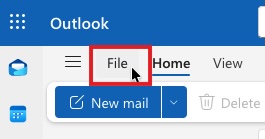
From the roof, we run a Cat5 Ethernet wire either to the unit, telecom closet, or the property's Ethernet patch panel. We are happy to comply with any building wiring guidelines or work with the building's riser company if required. 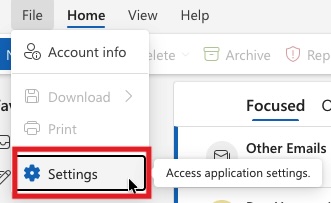
From inside the unit, the Cat5 Ethernet cable can be used to set up your internal network via your wireless router (wifi). 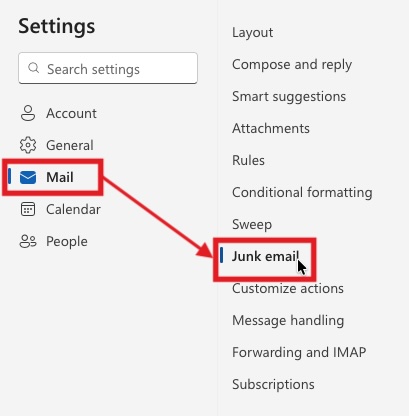
From inside the unit, the Cat5 Ethernet cable can be used to set up your internal network via your wireless router (wifi). 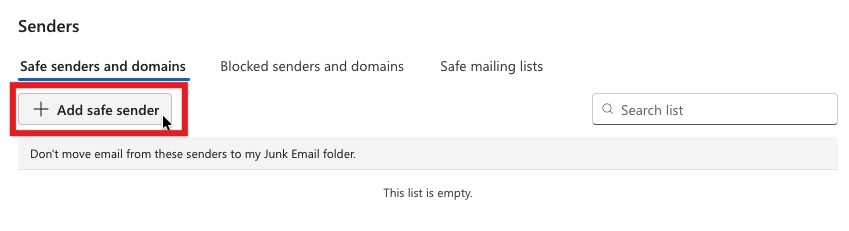
From inside the unit, the Cat5 Ethernet cable can be used to set up your internal network via your wireless router (wifi). 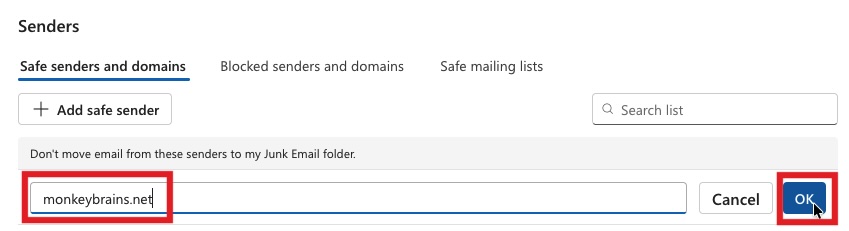
From inside the unit, the Cat5 Ethernet cable can be used to set up your internal network via your wireless router (wifi). 
Commercial buildings
Monkeybrains provides commercial-level bandwidth service to downtown San Francisco and beyond. We will mechanically affix FCC compliant wireless antennas atop the roof space in order to provide data services to said building and surrounding areas. If necessary, we can provide a non-penetrating roof mount (weighted base) in lieu of mechanically affixing equipment at the roof. The wire run typically consists of outdoor rated Cat5 being fished through the building's conduit, to the riser closet, or directly to the suite (in smaller buildings).
Please contact us about service for your business. For temporary or event-related service click here.
Microsoft 365
Monkeybrains is primarily a WISP (Wireless Internet Service Provider). What this means is Monkeybrains uses microwave technology to create a wireless network covering much of San Francisco. We deliver internet service to individual locations by placing an antenna on the roof. This antenna picks up an encrypted wireless signal from one of our network access points which can be found on over 1000 buildings city-wide. 
From the roof, we run a Cat5 Ethernet wire either to the unit, telecom closet, or the property's Ethernet patch panel. We are happy to comply with any building wiring guidelines or work with the building's riser company if required. 
From inside the unit, the Cat5 Ethernet cable can be used to set up your internal network via your wireless router (wifi). 
From inside the unit, the Cat5 Ethernet cable can be used to set up your internal network via your wireless router (wifi). 
From inside the unit, the Cat5 Ethernet cable can be used to set up your internal network via your wireless router (wifi). 
From inside the unit, the Cat5 Ethernet cable can be used to set up your internal network via your wireless router (wifi). 
From inside the unit, the Cat5 Ethernet cable can be used to set up your internal network via your wireless router (wifi). 
From inside the unit, the Cat5 Ethernet cable can be used to set up your internal network via your wireless router (wifi). 
From inside the unit, the Cat5 Ethernet cable can be used to set up your internal network via your wireless router (wifi). 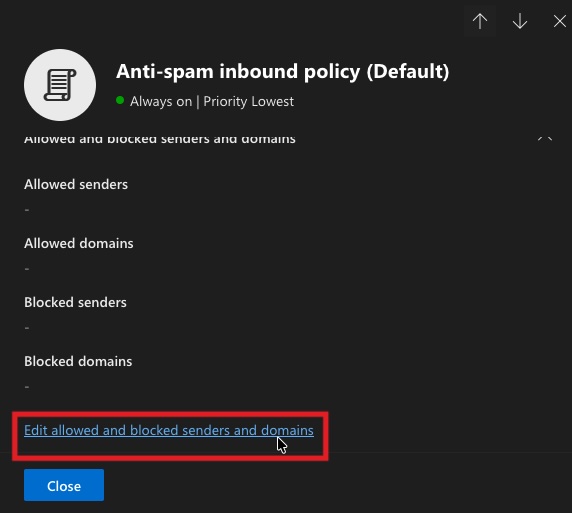
From inside the unit, the Cat5 Ethernet cable can be used to set up your internal network via your wireless router (wifi). 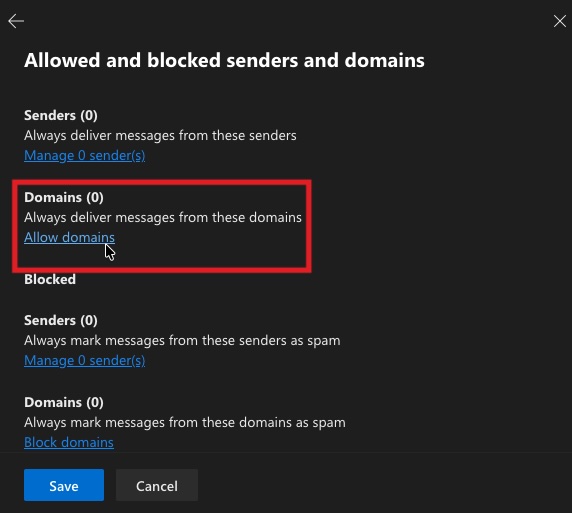
From inside the unit, the Cat5 Ethernet cable can be used to set up your internal network via your wireless router (wifi). 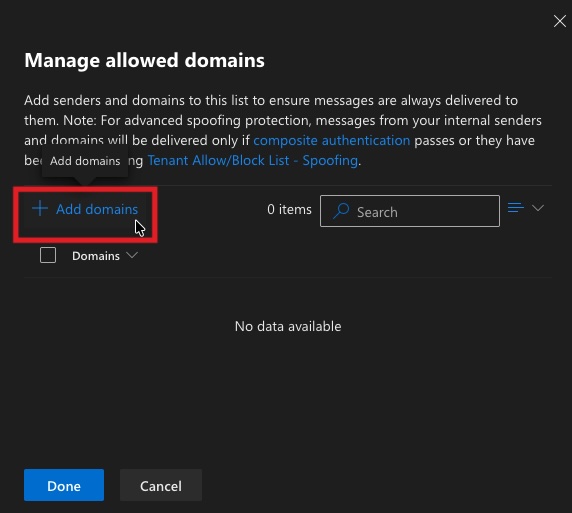
From inside the unit, the Cat5 Ethernet cable can be used to set up your internal network via your wireless router (wifi). 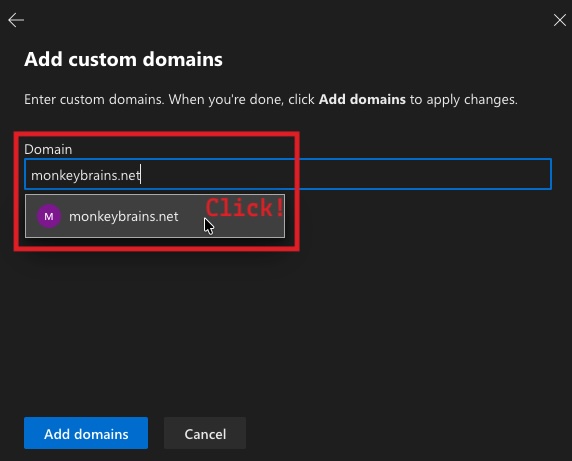
From inside the unit, the Cat5 Ethernet cable can be used to set up your internal network via your wireless router (wifi). 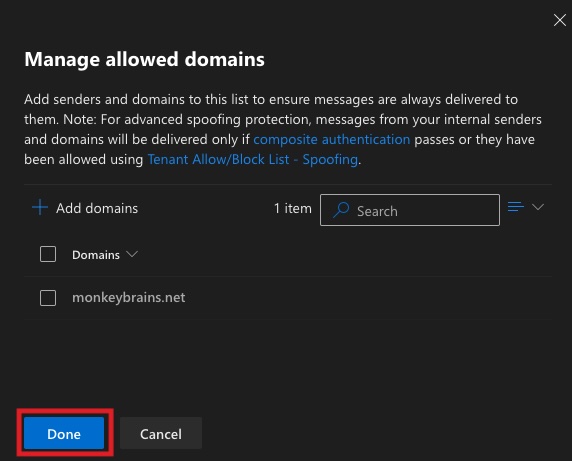
From inside the unit, the Cat5 Ethernet cable can be used to set up your internal network via your wireless router (wifi). 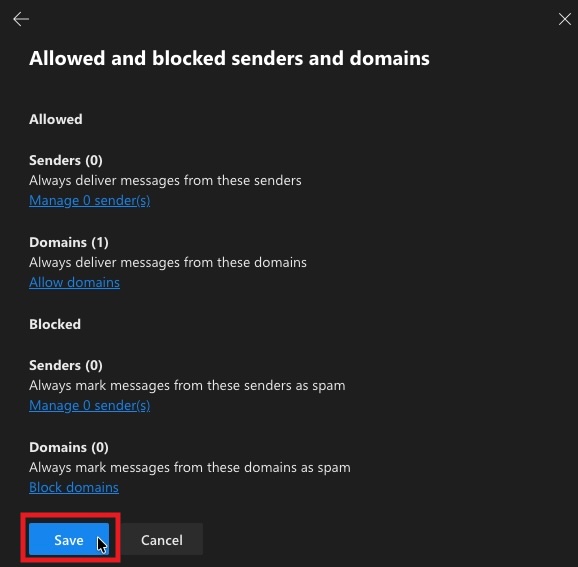
Limiting factors
While 98% of installations are successful, there are a few limiting factors:
- Obstructions such as trees, billboards, taller buildings, or surrounding topography. Unobstructed line-of-sight must be available between the antenna on your roof and one of our network access points.
- The building is too far out of network range to maintain a reliable internet connection. Take a look at our coverage area.
- Unreliable roof access: access to the roof must be available and safe.
- Limited mounting locations on the roof, due to a steeply pitched roof or unreliable roof access.
What are your rights regarding a rooftop installation?
We want you to be informed of your legal right to receive wireless internet service whether you rent or own your home.
The Federal Communications Commission (FCC) passed rules in 1996 regarding the installation of dishes for residents of apartments, condos, town homes and HOAs. The FCC ruled that a resident has the right to have a dish that is less than one meter (39.37 inches) in diameter. However, the landlord or the Homeowners As- sociation can enforce restrictions on common areas, such as the exterior of the building or the roof.
The FCC ruling also covers unreasonable installation or maintenance costs as well as unreasonable delays in installation, maintenance or use. This means that a landlord or Homeowners Association cannot ask you to pay unreasonable extra costs or createundue delays for you to use or install wireless internet equipment, nor can they prevent you from installing within the guidelines. For any questions or to receive the complete FCC rules, please visit www.fcc.gov.

